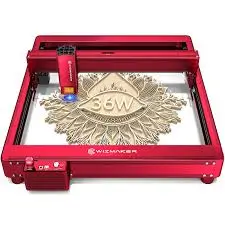
This Wizmaker Desktop Laser Engraver Review: The Ultimate 3.5W Engraver Under $110
The Wizmaker Desktop Laser Engraver has quickly become a hot topic among DIY enthusiasts and small-scale makers. As more people look for affordable entry points into laser engraving, this compact 3.5W machine promises professional features at a budget-friendly price. This Wizmaker Desktop Laser Engraver review covers everything you need to know — from its 0.04mm ultra-fine laser spot and blazing 12000 mm/min processing speed to its flexible WiFi, hotspot, and USB connectivity options.

What Is the Wizmaker Desktop Laser Engraver?
The Wizmaker Desktop Laser Engraver is a 3.5W diode laser engraving machine designed for home use, craft studios, and desktop workspaces. It features an ultra-fine 0.04mm laser spot for high‑detail engraving and a maximum processing speed of 12000 mm/min, which is significantly faster than many entry‑level engravers. The machine arrives fully pre‑assembled with a modular design, making it truly “plug and play” right out of the box. Its compact footprint fits easily on a desk, but it still delivers a 145 mm × 135 mm working area — a practical size for most hobby projects.
Wizmaker Desktop Laser Engraver review: Key Specifications at a Glance
| Laser Power | 3.5W diode laser |
|---|---|
| Laser Spot Size | 0.04mm |
| Max Processing Speed | 12,000 mm/min |
| Working Area | 145 mm × 135 mm (5.7″ × 5.3″) |
| Connectivity | WiFi, Hotspot, USB |
| Compatibility | Windows, macOS, mobile apps |
| Materials | Wood, leather, acrylic, paper, cardboard, fabric, coated metal, stone, cork |
| Assembly | Fully pre‑assembled |
| Support | 24/7 customer support |
Precision and Speed: 0.04mm Spot + 12000 mm/min
The Wizmaker’s 0.04mm laser spot allows it to produce remarkably fine lines and intricate details. For comparison, many low‑power engravers in this price range have a spot size of 0.08mm or larger. That difference becomes noticeable when engraving detailed logos, small text, or delicate artwork.
Where the Wizmaker Desktop Laser Engraver really stands out is its 12,000 mm/min processing speed. Most sub‑$200 engravers top out at 4,000–6,000 mm/min, so this machine can complete jobs in roughly half the time. That speed advantage is a game‑changer if you plan to run multiple projects back‑to‑back.
Working Area: 145 mm × 135 mm – Practical and Portable
The 145 mm × 135 mm (about 5.7″ × 5.3″) working area is well‑suited for personalized coasters, keychains, jewelry, phone cases, small signs, and custom business cards. While it won’t handle large cutting mats or full‑sized panels, this size strikes a smart balance between portability and utility for home and studio use. The company claims this is the largest carving surface among comparable compact engravers.

Connectivity and Software: WiFi, Hotspot, USB
Wireless connectivity is rare in sub‑$200 engravers, making the Wizmaker Desktop Laser Engraver review stand out. You can send files via WiFi, direct hotspot, or traditional USB. This machine works with popular software like LightBurn and LaserGRBL, plus the Wizmaker mobile app for simple drag‑and‑drop engraving from your phone.
Material Compatibility – What Can You Engrave?
The 3.5W diode laser is best suited for engraving rather than deep cutting. Supported materials include wood, basswood, leather, dark opaque acrylic, paper, fabric, coated metal, stone, cork, MDF, and cardboard. For raw metal engraving, a higher‑power diode is needed, but the Wizmaker handles most hobbyist materials with excellence.

Safety and Build Quality
The Wizmaker Desktop Laser Engraver includes an acrylic shield around the laser module to protect your eyes from accidental exposure. However, you should always wear certified laser safety glasses when the machine is running. The modular design includes a sturdy aluminum frame that resists vibration during fast engraving passes, helping maintain accuracy at high speeds.
Ease of Use for Beginners
One of the strongest points in this Wizmaker Desktop Laser Engraver review is its beginner‑friendly setup. The machine ships fully pre‑assembled — no fiddling with brackets, belts, or loose screws. You simply unpack it, connect the power cord, load your material, and start engraving. Wizmaker provides a complete toolkit and step‑by‑step guide, with 24/7 customer support available for troubleshooting.
✅ Pros
- Ultra‑high precision – 0.04mm spot produces crisp, detailed engravings.
- Blazing speed – 12,000 mm/min completes jobs faster than most competitors.
- Wireless connectivity – WiFi and hotspot support add real convenience.
- Pre‑assembled – Truly plug‑and‑play right out of the box.
- Great value – Priced under $110 for the feature set.
❌ Cons
- 3.5W power is for engraving, not heavy cutting – not for thick plywood.
- Small working area – Not suited for large signs or bulk production.
- No rotary attachment included – Engraving cylindrical objects requires a separate accessory.
🛒 Where to Buy the Best Deal
👉 Grab the Best Deal on Amazon✅ Lowest price guaranteed | ✅ Free shipping for Prime | ✅ 30-day returns
Who Is This Laser Engraver For?
This machine is ideal for hobbyists and DIY crafters, Etsy sellers, students, and educators. It’s also a perfect gift for anyone new to laser engraving. If you need a capable, budget‑friendly engraver for creative projects, the Wizmaker Desktop Laser Engraver is a fantastic choice.
⭐ Final Verdict – Wizmaker Desktop Laser Engraver review
This Wizmaker Desktop Laser Engraver review confirms that you don’t need to spend $500 to get a high‑precision, fast, and user‑friendly engraving machine. The combination of a 0.04mm ultra‑fine laser spot, 12,000 mm/min processing speed, and wireless connectivity is genuinely impressive at the $102.57 price point (15% off retail). For hobbyists, crafters, and small‑business owners just getting started, the Wizmaker delivers outstanding value.
👉 Perfect for engraving wood, leather, and coated metals with professional finish.
🔗 Limited time offer – price may change, but the value stays!
This Huepar ZK04CG-LR300 Review: The Ultimate 360° Laser Under $250
Leave a Reply